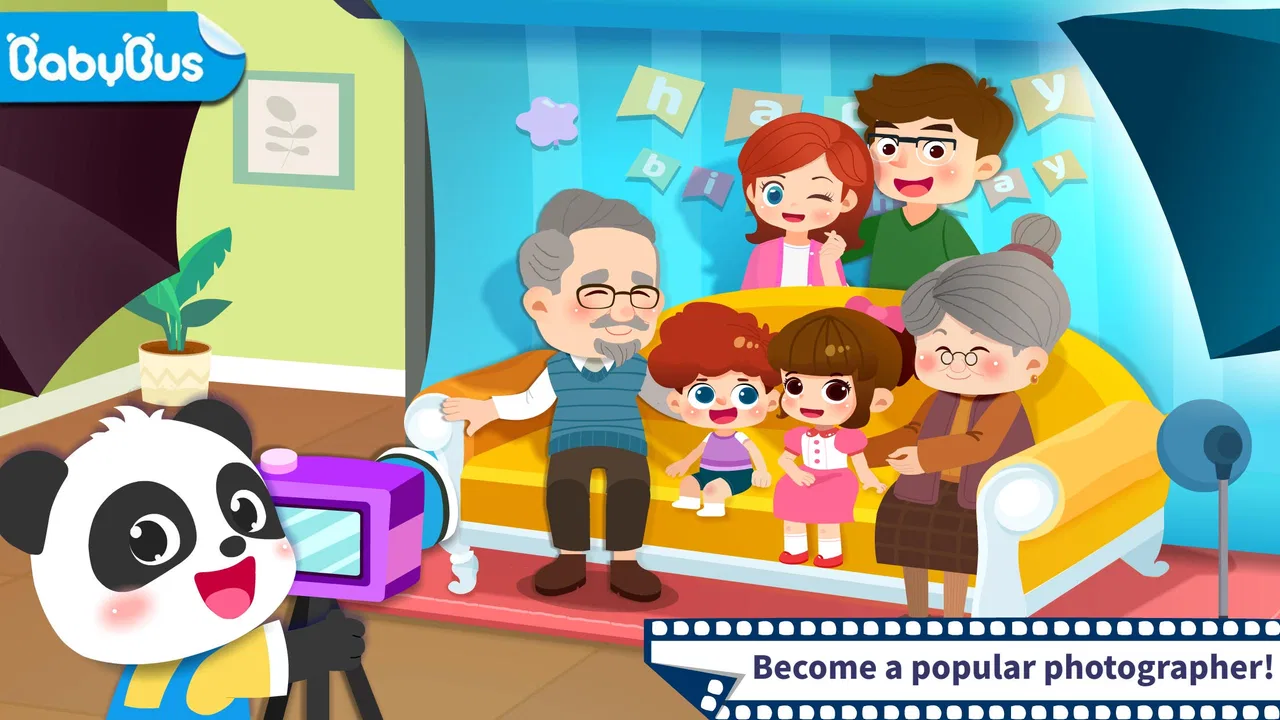
Baby Panda's Photo Studio
- 4.0
- Rating
- 5.00M
- Installs
- Free
- Price

 Analysis by App-foxy
Baby Panda's Photo Studio is the kind of educational game I would hand to a young child who enjoys pretending to be grown-up. Instead of asking the player to manage a complicated camera or learn technical photography terms, it turns the idea of running a photo studio into a simple, playful activity. I found the appeal strongest in the combination of role-play and visual discovery: the child is not just looking at pictures, but taking part in a small creative routine built around different photo styles.
It is a free game from BabyBus, listed for Everyone, and it runs on devices using Android 6.0 or later. The app has reached over five million installs and holds a 4.0 average from around six and a half thousand ratings. Those figures suggest that it has found a substantial audience, although they do not replace a parent’s own check of whether the presentation suits a particular child. In-app purchases range from $0.99 to $2.49 per item, so the free entry point is useful, but families should still pay attention to purchase controls.
How the studio feels to use
I find the studio idea easiest to enjoy when I treat each visit as a small creative task, not a race through screens. A child can make a choice, pause to notice the result, and explain what they like about it; that simple rhythm gives an adult room to encourage attention without turning play into a lesson. Next, I’ll look at how that rhythm can guide a first session.
You May Also Like

 Blood Strike: 2.5 Anniversary
Blood Strike’s Loadouts Turn Every Drop Into a Tactical Gamble
A close look at Blood Strike’s custom loadouts: how fast access to signature weapons reshapes its battle royale rhythm, rewards preparation, and narrows the gap between fights.

 Pandora - Music & Podcasts
Pandora’s Music Is Easy to Start, but Harder to Recover
Pandora’s strength is its low-effort path from a seed to a station. Its weak spot is how much confidence it asks you to place in connection, setup, and quiet recovery.

 8 Ball Pool
 Is Built on Rivalries, Rematches, and Routine
A close look at the rivalries, rematches, shared routines, and unanswered safety questions that turn a quick pool match into a persistent mobile community.

 Samsung Music
’s Quiet Strength Is Playing What You Already Own
Its reach comes less from spectacle than from dependable access to a personal library. That simplicity is both the app’s strongest retention engine and its ceiling.

 AccuWeather: Weather Radar
AccuWeather Review: A Quick, Clear Forecast for Everyday Decisions
For everyday plans, the best forecast is the one you can understand quickly. AccuWeather makes rain timing, radar, and local conditions easy to act on, with a few trade-offs.

 Hill Climb Racing
Why Hill Climb Racing Still Turns Crashes Into One More Run
A tiny car, a bumpy hill and one more upgrade: Hill Climb Racing keeps resurfacing because its simple chaos makes every near-miss feel personal.
More From Our News Desk



Readability and navigation for young players
My first impression is that the game communicates mainly through pictures, characters, and direct visual prompts rather than long explanations. That is a sensible choice for an early-learning title. A child who cannot read confidently can still understand the basic invitation: enter the studio, choose an activity, and take part in making a photo. The central idea is visible quickly, which reduces the need for an adult to translate instructions line by line.
The studio theme also gives the interface a natural structure. A child can connect the room, the camera activity, and the finished image as parts of one pretend job. That is more approachable than a conventional camera app, where icons may be abstract and the purpose of each control is not obvious. Here, the educational value comes partly from sequencing: choosing what to do, noticing the visual result, and moving on to another style.
I would still sit with a first-time player for a few minutes. Young children can tap every bright object on the screen, and playful interfaces sometimes make it unclear whether a tap changes the activity, confirms a choice, or simply triggers an animation. The game is easier to understand when an adult initially names the options aloud: “This one changes the picture,” or “Now we are ready to take the photo.” After that short introduction, many children will likely be able to explore more independently.
For children who benefit from predictable routines, the photo-studio setting is helpful. The repeated pattern of preparing a picture and seeing the result can feel reassuring. It also creates a natural opportunity for a parent to encourage language: ask the child what style they chose, what they notice in the image, or what they might try next. I see this as a stronger use of the game than simply leaving it open as background entertainment.
The visual approach has a trade-off. It supports children who are still developing reading skills, but it may not provide enough detail for a child who needs explicit written directions or more advanced explanations. This is a pretend photography game, not a structured lesson in composition, lighting, or camera technique. If the child wants to understand why a real photograph looks different, another educational resource will be more suitable.
Motor and sensory considerations
The basic interaction appears well matched to children who can tap and make simple selections. There is no reason to expect a young player to perform precise photo editing or coordinate several controls at once. That keeps the entry barrier lower than in a real editing application. A child with developing fine-motor control can focus on choosing and observing rather than dragging tiny sliders or typing labels.
That does not mean every child will find it equally comfortable. Tap-based play still assumes that the player can reach visible controls accurately and distinguish one interactive area from another. Children with limited hand movement, tremors, or difficulty maintaining a steady touch may need a parent to share control. In that situation, the game can work as a cooperative activity, with the child choosing the style and the adult handling the more difficult taps.
The colorful presentation may be engaging for children who respond well to visual variety, but it can also become tiring for players who are sensitive to busy screens, movement, or strong sound effects. I would begin with a short session rather than assuming that a child will enjoy a long stretch. Watching the child’s behavior matters more than the age label: if they become restless, cover their ears, or stop following the activity, the best adjustment may be a break rather than more encouragement.
One practical tip is to use the game when the child is rested and the device is held steadily on a table. That removes two avoidable difficulties at once. A moving screen makes tapping harder, while a tired child may find even a simple choice frustrating. The game’s playful pace works better when the adult treats it as a small activity with a beginning and an end, not as something that must occupy the child indefinitely.
I also would not describe it as a substitute for hands-on creative play. A child who dislikes screen animation may get more from a toy camera, paper, crayons, or a real family photo session. The game is most useful when it adds a safe pretend environment to those experiences. For example, a parent can let the child explore the studio first, then take a few ordinary pictures together and compare the difference between pretend styling and a real camera.
Using it in different everyday situations
At home, the game fits naturally into a short quiet period before dinner or during a rainy afternoon. I would use it as a conversation starter rather than a silent babysitter. After a child makes a picture, I might ask what the person in the photo is doing, which style feels happiest, or what the studio should offer next. Those questions turn a simple tap-through activity into practice with observation, description, and decision-making.
It can also work well during shared play between siblings of different ages. A younger child can make the choices, while an older sibling can help explain what happened on screen or invent a story around the finished photo. This avoids making reading ability the only way to participate. The older child is not merely waiting for a turn; they can become the “studio assistant,” which gives the activity a cooperative purpose.
For travel, the small, self-contained format is convenient, especially when the child wants something familiar and the adult needs a calm distraction. I would prepare the device before leaving and check the controls used for purchases. A game that is easy to start can also be easy for a child to revisit repeatedly, so a clear agreement about when it may be used is worthwhile.
In a classroom or therapy setting, I would treat it as a prompt for guided interaction rather than a complete teaching tool. An adult could use the photo-studio theme to discuss clothing, facial expressions, colors, or the steps involved in making an image. The important distinction is that the educational outcome comes from the conversation and the child’s choices, not from assuming that the game alone delivers a formal curriculum.
Situational access matters for another reason: a child may enjoy the game differently depending on who is nearby. A confident adult can help a hesitant player understand the visual flow, while a child playing alone may stop when an unfamiliar screen appears. If independent use is the goal, I would watch one full session first and see whether the child can recover from a wrong tap without becoming upset.
Where the inclusive experience still has limits
The Everyone rating makes the game broadly approachable, but an age label is not the same as a guarantee that every child will be comfortable with it. Children differ in reading ability, attention, motor control, hearing, vision, and tolerance for animation. The most inclusive way to use this title is to adapt the situation around the child: shorten the session, play together, reduce distractions, or offer verbal explanations when needed.
There is also a difference between visual simplicity and full accessibility. A picture-led interface can help a non-reader, but it may be less helpful to a child who relies on spoken guidance or has difficulty distinguishing visual elements. I would not choose this as the only creative app for a child who needs robust alternative input, highly adjustable presentation, or a clearly documented accessibility system. A more specialized tool may provide better support in those cases.
Another limitation is the likely narrowness of the role-play. The game centers on taking photos in a studio, so children who prefer open-ended building, drawing, music, or physical movement may lose interest quickly. That is not a flaw in the concept, but it affects who should download it. I see it as a focused activity for imaginative photo play, not as a general replacement for a drawing app, a camera lesson, or a broad early-learning suite.
Families should also think about the free-to-play boundary. The game costs nothing to start, which makes it easy to test, but optional items priced between $0.99 and $2.49 can change the experience for a child who wants to unlock or add something. I recommend setting device purchase restrictions before handing over the phone or tablet. That is especially important when the child cannot yet understand that a colorful button may lead to a real charge.
The current version is 8.73.00.00, and the game was released on February 24, 2021. For everyday use, the more important point is to keep the app and the operating system in a state that works reliably on the chosen device. On an older phone or tablet, I would test the game before a trip or a planned activity rather than discovering a compatibility problem when the child is already expecting to play.
What makes it different from ordinary alternatives
A standard camera app gives children access to a real lens, but it usually assumes that they already understand icons, camera modes, and the consequences of changing settings. Baby Panda's Photo Studio removes that technical weight and replaces it with pretend work in a friendly setting. That makes it better for a child who wants immediate creative feedback, while the ordinary camera is better for learning how actual photography behaves.
Compared with a general drawing app, this game offers a more defined scenario. The child is not starting with a blank canvas; they are entering a studio and making choices within a photography theme. That structure can help a child who feels lost when given unlimited tools. On the other hand, a drawing app will usually offer more freedom for children who want to create their own characters, shapes, and scenes from scratch.
Compared with a broad educational collection, the photo-studio game is narrower but easier to explain. I would choose it when the child is specifically interested in pictures or pretend jobs. I would choose a wider learning app when the goal is to move between early literacy, numbers, puzzles, and creative tasks in one session. The right option depends on whether the child needs a focused theme or variety.
One less obvious strength is that the studio setting gives adults a useful bridge between digital and real-world photography. Instead of asking, “Did you have fun?” a parent can connect the screen to a real task: arrange a stuffed animal, choose a background, take a picture, and talk about what changed. The game becomes a rehearsal for noticing visual choices, even though it should not be presented as professional camera training.
Another useful approach is to let the child make a deliberate mistake. Choose an unexpected style, look at the result, and ask whether it matches the intended mood. This turns the game into a gentle lesson about cause and effect without making the child feel tested. It is particularly helpful for children who learn better by experimenting than by listening to instructions.
My inclusive verdict
I recommend Baby Panda's Photo Studio for families looking for a short, visual, role-play game about making pictures. Its strongest audience is young children who enjoy pretend occupations, clear visual choices, and immediate creative results. BabyBus has kept the central idea approachable, and the free starting price makes it practical to try before deciding whether it belongs in a child’s regular rotation.
I would recommend shared play at first, especially for children who need help with navigation, have motor challenges, or become overwhelmed by busy audiovisual presentation. The game can be inclusive in practice when an adult adjusts the pace and treats the child’s choices as the main event. That flexibility is more valuable here than expecting the app to solve every access need on its own.
I would skip it if the child needs advanced accessibility controls, formal photography instruction, extensive open-ended creation, or a completely quiet and low-stimulation experience. In those situations, a specialized alternative will likely be a better fit. I would also avoid leaving purchase decisions entirely to a young player, since optional items can cost up to $2.49 each.
Overall, I see this as a friendly first step into digital photo play rather than a deep game. It works best in small sessions, with a parent or sibling ready to talk about the images and help when the interface becomes unclear. Its real value is the accessible pretend scenario: a child can explore the idea of being a photographer without needing to understand a real camera first.
FAQs for Baby Panda's Photo Studio
01What is Baby Panda's Photo Studio?
Baby Panda's Photo Studio is a child-friendly creative app where young players can take part in playful photography activities. Children can choose characters, backgrounds, costumes, accessories, and decorative elements to create colorful pictures. The app is designed around simple tap-based interactions, making it accessible for preschool users who enjoy imaginative play and visual customization.
02Is Baby Panda's Photo Studio suitable for young children?
The app is primarily aimed at preschool-aged children and uses bright visuals, friendly characters, and straightforward controls. Most activities are easy to understand without reading complex instructions, although younger children may still need help navigating menus or selecting options. Parents should review the available content and settings to confirm that it matches their child’s age and interests.
03Does Baby Panda's Photo Studio require an internet connection?
Many of the creative activities in Baby Panda's Photo Studio can generally be enjoyed without a continuous internet connection once the app and its required resources are installed. However, internet access may be needed for downloading the application, receiving updates, loading additional content, or accessing certain features. Availability can vary by device, version, and region.
04Are there advertisements or in-app purchases in Baby Panda's Photo Studio?
Parents should check the current store listing before downloading because advertising and purchase policies may differ between versions and platforms. Some children’s apps from the same developer can include optional paid content, advertisements, or parental sections. It is recommended to enable device-level purchase restrictions and supervise use, especially if the app is installed on a shared family device.
05What can children do in Baby Panda's Photo Studio?
Children can participate in pretend photography sessions by selecting visual themes, dressing up characters, arranging scenes, and adding decorations to their pictures. The experience focuses more on creativity and exploration than on complex objectives or competitive gameplay. It can encourage storytelling, recognition of colors and objects, and experimentation with different combinations in a relaxed environment.
Pros
- Simple controls make it suitable for preschool-aged children.
- Creative photo effects encourage imaginative play and self-expression.
- Bright visuals and friendly characters are appealing to young users.
- Short activities are easy to complete without requiring long attention spans.
- Designed as a playful
- low-pressure experience without competitive stress.
Cons
- Some activities may feel repetitive after repeated play sessions.
- Limited depth may not keep older children interested for long.
- Photo features can require access to the device’s camera or gallery.
- Young children may need adult guidance to navigate menus safely.
- Availability of certain content may vary by device or app version.

Baby Panda's Photo Studio
Gallery